

Fitness channels on YouTube are a moving target. New exercise routines, challenges, transformations, and tips come flooding in by the day. To personal trainers, gym owners, or those who create workout routines, thumbnails are no longer an inconvenience; they’re an act in the performance itself.
This explains why some creators feel the need for a YouTube thumbnail maker as a means to cope with the requirements. Because of the likes of Dreamina, artificial intelligence in making thumbnails raises concerns about originality, too.
Let’s break down both sides of the equation.
Why fitness thumbnails come with additional pressure
Thumbnails sell more than a video; they sell results. They require energy, credibility, and realism simultaneously. In fact, if it appears too flat, it is simply ignored. That’s one thing. If it appears too realistic, it is simply doubted.
Compared with other niches, fitness communities are extremely receptive to visual communications because of these factors:
- Muscle definition and posture
- Facial strain or effort
- Before and after implications
These aspects of human existence can be enhanced by AI tools in a short period of time. However, the point at which amplification and honesty meet is the most intriguing part of this aspect.
The speed edge no human designer can ignore
One of the main reasons Personal Trainer creators use AI Thumbnails is the matter of speed. When you’re uploading a few workouts each week or running a gym series while also working with clients, design time becomes a bottleneck.
The AI tools enable the following for the creators:
- Develop varied thumbnail designs in minutes
- Associate pictures with the intensity of the workout immediately
- Be consistent despite a hectic training schedule
This is particularly useful for solo trainers who do not have a design team to back them up.

Consistency creates an identifiable fitness brand
In terms of visual consistency, AI thumbnails perform admirably. Indeed, for fitness influencers, consistency can only mean professionalism.
The reason why using AI tools makes it easier to maintain the project files compared to
- The same lighting style throughout the videos
- A similar shape of the body or face
- Repeated colors for strength, HIIT, or recovery videos
With time, the audience can identify with the style and automatically connect it with the training philosophy even before the title is read.
Where authenticity can start to slip
The flip side is that sometimes AI can make fitness models a bit too realistic-looking.
Too much muscle definition detail in the skin and posture may raise an air of distrust—particularly in a community which is seen as setting unrealistic standards. Hard work and realism appeal to the fitness community. Thumbnails that appear unrelated to the video may offend the viewer for misrepresentation.
At this point, the creators will have to direct the AI as opposed to allowing it to be exaggerated by itself.
Sharper visuals without artificially fueled gains
When utilized correctly, techniques such as the use of the image upscale may actually safeguard the authenticity of the artwork. This technique will not alter the definition of the human physique; rather, it will make the artwork clearer by depicting sweat or hard work.
This way, thumbnails remain honest while still appearing professional on a larger screen display as well as on mobile devices.
The branding versus personality conundrum
Fitness bloggers can attract audiences based on personality, not just physicality. AI thumbnails could make images so standardized that they have a standardizing effect on individuality.
Sometimes, creators observe that:
- Expressions becoming generic
- Suggests pose feels
- Energy doesn’t align with the actual vibe
The solution isn’t to stop using AI, it’s to tailor it to your needs so that even the final thumbnail outcome is still “you.”
Startups and established brands include AI video creation into the workout routine
Beyond static thumbnails, many fitness startups and established brands first conceptualize their creative direction through the creation of photorealistic fitness images with Dreamina. These images provide a kind of visual blueprint for workout concepts-such as a full-body burnout pose or a calm mobility stretch-that allows creators to define intensity, posture, and tone well in advance of filming. Once these images have been defined, they can be animated into short preview videos or avatar-based talking visuals that help teams align on direction without having to record live footage.
A deepfake AI tool can be responsibly used for an experimental or internal application in creating a realistic trainer image or avatar that states a very neutral instructional statement for conceptual previewing or testing. The focus of this workflow is essentially on creating video content based on prompts or reference visuals, without motion tricks or looping effects-a great way to visualize fitness content before the full creation of the video.
When AI is best in fitness thumbnails
Tools based on artificial intelligence perform best when content developers ensure the following:
- They can be used as a basis, and not as a conclusion
- Change the status actions to match real physical activity
- Integrate images heavily with the exercise being performed
Here, AI is utilized as an efficiency enhancer, not as an easy way out that undermines trust.
Dreamina’s 3-step approach for AI thumbnails
You can always prioritize uniqueness over feeling artificial. This is because the workflow of Dreamina enables fitness creators to have control while enjoying the benefits of quickness. Here is how the process integrates into a fitness training schedule.
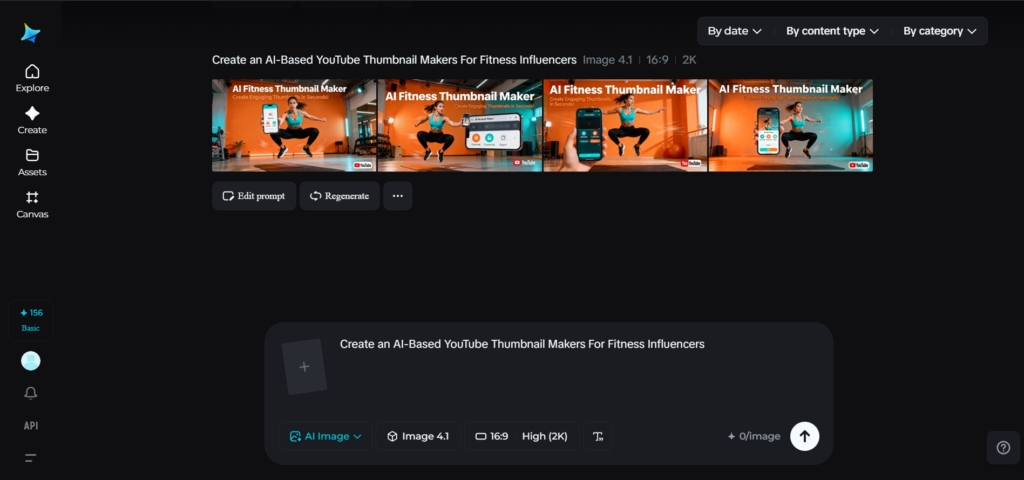
Step 1: Construct a text message template
Go to Dreamina and begin by writing a text description that best fits your fitness routine, activity level, and personality type. For example, explain things like posture, energy level, environment, and mood in detail.
Example of the original question: Create a YouTube thumbnail for a fitness workout video showing a muscular trainer mid-exercise, focused expression, sweat visible, gym background, strong lighting, powerful and realistic tone, high-energy but authentic.
Thus, this level of detail enables Dreamina to prevent exaggerated/unrealistic outputs.

Step 2: Adjust parameters and generate
Next, modify the technical settings. Choose a suitable model based on which dreamina is currently working on, select a YouTube-friendly aspect ratio, size, and whether thumbnail resolution is 1k or 2k based on the level of clarity needed.
Finally, click on the dreamina ‘generate’ icon to create the thumbnail.

Step 3: Customize and Download
Once generated, the image is then AI-refined using Dreamina’s AI image refinement tools. Here, you can use the inpaint tool to fix some minute details, the expand tool for better framing, or the distraction removal tool to get the image retouched. Once you think the thumbnail represents your actual training style, click the “Download” button.

The true trade-off that fitness creators must make
AI-generated thumbnail creators have some unalienable advantages, such as speed, consistency, and creativity assistance. However, in the health segment, where credibility comes from actual exercise and genuine progress, over-automation can be quite counterproductive.
Instead, “winners” are the creators who harness AI technology as a training partner, and Dreamina allows fitness influencers to move even faster, if the essence of their hard work and toil is in every thumbnail.